Tuesday, March 19, 2019

Learning Beyond the Class with Goosechase!

Do you like adding gamification and competition into your classes?
Want to take demonstrations of learning outside your classroom walls?
How about getting your students to collaborate, connect and communicate in real time?

Try Goosechase!

Yesterday I had the opportunity to present on GooseChase to instructional coaches in IU 8, 9 & 10.

The coaches, principals and mentors had a blast with this digital scavenger hunt.


Now it's your turn SMA!  
Which building will come out on top?

Start strategizing now!  
  • Up to 5 teacher-leaders from each building should download the Goosechase App on their phones
  • Search for "SMA Teacher Goosechase" (no acct. required)
  • Find your building
  • Your team password is your principal's last name
  • Start completing missions!!!!  Get text, photo and video evidence about why your building is the best in SMASD! 
  • The building with the most points by next Tuesday will get faculty room treats! 


Ready to learn more & use it in your classroom? 


My presentation website is HERE.  

Click through the top to find a presentation, ideas, how to & more. 


Click HERE for a direct link to the setup tutorial.


Tuesday, March 12, 2019

Kickin' It with ClassKick

Classkick.com is a site that has been on my to-do list for quite some time.
Image result for classkick
It is a way to deliver asynchronous content to your students so they may guide themselves through something as simple as an exit ticket, to something as complicated as an entire slidedeck with embedded activities.

Students can write, draw, type, use manipulatives, add images and even.....
- Anotate a worksheet! 
- Record their thinking with an audio recorder!


The teacher dashboard shows you at a glance where each student is located in his/her work.

It even has a feature that allows the student to raise his/her hand letting you know he needs help!  The teacher can then go over and assist the student, or help him via a chat/feedback conversation that wouldn't draw attention to a student who is embarrassed to get help in front of his peers.

Despite all of these features I hesitated to introduce Classkick as it seemed as if it was a lot of work on the front end with lesson design. Until I found out that...

  You can upload multiple page PDFs!   
Finally, an answer for all of our TpT junkies :-)! 

As a sample, I have created a Classkick assignment that highlights many, but certainly not all of its features.

Join in as a student and see how you like it!

Go here to get started!  https://app.classkick.com/#/login/OK2Z7H


Teacher overview: 

- See where each student is working. 
- See results of auto-graded questions
- Easily grade finished slides. 
- See which students have their "hands raised"


You can even give stickers that award different point values and come with custom feedback!  


This is certainly an elementary example, but can be used for MS & HS just as well.   
I cannot wait to try it in Spanish class, especially with the easily embedded audio recordings for fluencies! 


Check out this video to see how I created the April Morning Work Classkick assignment! 

Or, view this video to see the awesome features of the teacher dashboard to view student progress in real time! 


Tuesday, March 5, 2019

Not another poster... Throwback Post

One year ago we posted about alternatives to poster projects, such as interactive Google Slides, Info graphics & Fictitious Social Media profiles.

Mrs. Bothun's high school students ran with the idea this year in their "If the heart was an amusement park" assignment.  I was lucky enough to have visited and witnessed some really great interactive presentations.

Cardiovascular Candyland was one of my favorites.  It sent students through a tour of the heart with comprehension checks along the way.  If questions were answered correctly, the tour continued.  If incorrect the participant was redirected to review information and asked to repeat the question.

Other students took the same concepts and applied it as if the human heart was an "Escape Room". Yet again, another great example of a presentation where the audience had some say in how the presentation was led.  Something like this would be very cumbersome with a stereotypical, linear presentation that goes from slide 1 - 20.


Cick here for a video segment of Cardiovasular Candyland!


Mrs. Bothun's interactive presentations, as well as Mrs. Wensel's VR/360 Tours are both featured on the Tech Showcase.  Be sure to check it out and let us know if you have something for display! 


Tuesday, February 26, 2019

Google Maps, Tours & More!


This week in 8th grade Spanish we are mastering phrases that help us tell the weather.  To demonstrate learning with an added bit of geography and culture, we head to Google My Maps.  
My Maps is an application located in your Google Drive > New > More > Google My Maps. Here you can create and store maps just as you would other Google Files such as Docs, Sheets, Slides & Forms. 
Image result for google maps
For this assignment I created a template that included directions and a sample "pin". 
I created 5 copies of the map and assigned it to 5 groups on Google Classroom, allowing them editing rights. Students will spend time this week dropping pins in different parts of the Hispanic world.  Students are able to add a title, a text description and an image to any pin.  For me they are adding the location name in Spanish, the current weather and a picture of an iconic place in that country. 

Easy to share, easy to collaborate & easy to review. 


Google Tour Builder

Do your students have a story to tell with their map?  Do the pins have relationships or a chronological order?   Try Google Tour Builder!   It is similar to Google My Maps, but it connects the pins to create a story. Photos and text can still be added to each pin.  The tour then has a cronolgical presentation.


Check out this blogpost from Eric Curts of controlaltachieve.com to learn more about Tour Builder and to see more examples of tours for history, literature, science, art and more!


Google Tour Creator

Do you have some students who desire an extra challenge in their map projects?   Have them take it one step further with VR and Google Tour Creator!

Students can create a Virtual Reality Experience with their tour by adding 360 images found from Google Street View.


Sra. Wensel's Spanish classes have already immersed themselves in the streets of Spain.  Students created tours of prominent cities in the country and presented to their peers.


Tours are created by adding "scenes".  Each scene gets a 360 image, a title and a description.  You may also add hotspots with an overlayed image and a detailed description.


Click HERE to see some examples of tours that can be used on your board, student devices or with VR goggles.


If you can map it ... you can build it!   With Google My Maps, Google Tour Builder and Google VR Tour Creator the options are endless!

How do you see yourself using Google Maps in your classroom?  Comment below.

Interested in using Maps and Tours in your class?  Let me know, and I will help you through the process!


Tuesday, February 19, 2019

Let's Talk Elementary Math!

I am always searching for ways that math teachers can effectively incorporate tech into their classrooms.  This year at Pete & C I, along with Mrs. Bauer & Mrs. Michuck were able to attend a session on Math in the Elementary Classroom. 

The session spoke a lot to the M.A.T.H. station rotation model with some really great variations on how to implement it in your classroom, while leveraging technology tools in some of the stations.

The Math Learning Center's Website & Mobile Apps offered a space for digital manipulatives for: 

- fractions
- money
- number rack
- number frames
- pattern shapes 
& more! 

Click HERE to open an interactive PDF. Then, click on the squares to be taken to each different web-app. 

I am picturing students app-smashing these tools with SeeSaw for annotating screenshots of their work as well as creating screencast videos where the student's explain their thinking.


Also these may serve as great impromptu teaching tools on your interactive whiteboard. 

Are you an elementary math teacher?  Have you used the Math Learning Center's Web-based Apps? 
How do you think these could be incorporated into your classroom?  Pros? Cons?  

Let us know in the comments below! 

......... Interested in the M.A.T.H. Station model with Tech Integration? Schedule a visit! 


.......   Didn't find what you were looking for?  Browse this large list of elementary math resources provided by the presenter. 

Resources for this blogpost were provided by Jennifer G. Southmayd
Instructional Technology Coordinator
West Chester Area School District

Thursday, February 14, 2019

ClassroomScreen.com

Student-Centered-Learning.
Do-Now.
Classroom Management.
Ready-to-Go.
No Prep.


Classroomscreen.com  is a website that I discovered while here at PETE & C.  
In lieu of an ActivPanel teachers can load up this one-stop site and have frequently-used
widget tools at their disposal.


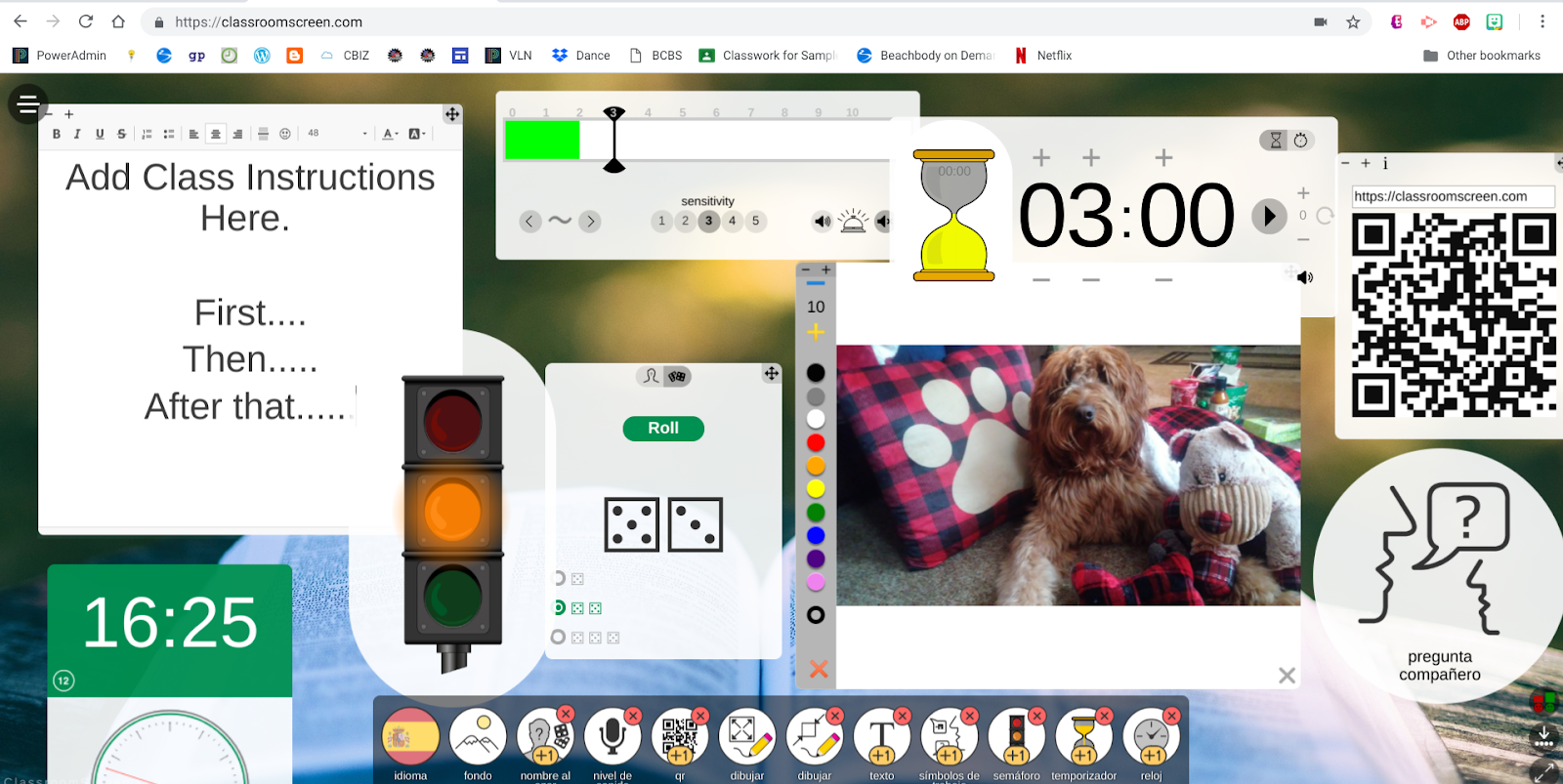
The screen offers the following widgets that are ready for immediate impromptu use:

Image result for classroom screen- Random Name Selector
- Dice Roller
- Noise Level Indicator
- QR Code Display
- White Boards
- Instruction Text Boxes
- Instruction Symbols/Signs
- Traffic Light
- Timer
- Clock


Be sure to click ALL the buttons at the bottom & the hamburger in the top left for all
the customizing options.


No account needed, so go ahead try it now!


Tip:  If you want to save your screen from class to class "Pin Your Tab".


Enjoy & Let Us Know How You Like It!

Tuesday, February 5, 2019

Grading Gone Digital

Grading & Giving Feedback has come a long way from EZ graders &  Red Pens...


Image result for ez grader


Come and See the Tools, Techniques & Expertise I have compiled for my presentation


I have curated resources for teachers into a Google Site.   I hope that my #GoDutch colleagues will find it of use and can send me any feedback on it before I share it with educators from across the state.

In the website you will find resources on: 
and more! 


I would love if you are able to take a moment to check out a portion of the site that speaks to you and what you do in your classroom.   

Send me some feedback in a comment below and/or add to the discussion on the last tab of the site! 


Prefer a video?  I created some "dry run" videos talking out each section of the site.  They are a bit lengthy, (note to self, need to be more concise when going live) but definitely of value if you see a digital grading or feedback strategy that sparks your interest. 


Thank you so much for inspiring me to find such a variety of methods to create feedback dialogues & conversations with our students!